
Finding and Installing Skills
In this article, we look at several ways to find and install plugins and skills.
Mental Model: Plugins and Skills
A skill defines a set of instructions for how to complete a single task. A plugin consists of one or more related skills, and may contain other related extensions such as hooks and MCP server configurations.
TIP
Think of it like npm packages vs. modules: a plugin is the distribution/install unit (like a package), while a skill is the functional unit inside it (like a module). Plugins bundle one or more skills along with optional extensions like hooks and MCP server configurations. When you install a plugin, you get all the skills it contains.
Skills are the simplest extension mechanism and the most portable — they work across Claude Code, Codex CLI, Gemini CLI, and Cursor without modification.
Skill Storage Locations (Scope)
There are two scopes, user and project:
| Scope | Path | Use case |
|---|---|---|
| User (global) | ~/.claude/skills/ | Personal skills across all projects |
| Project | .claude/skills/ | Team-shared, committed to repo |
Method 1: Plugin Browser (Interactive TUI)
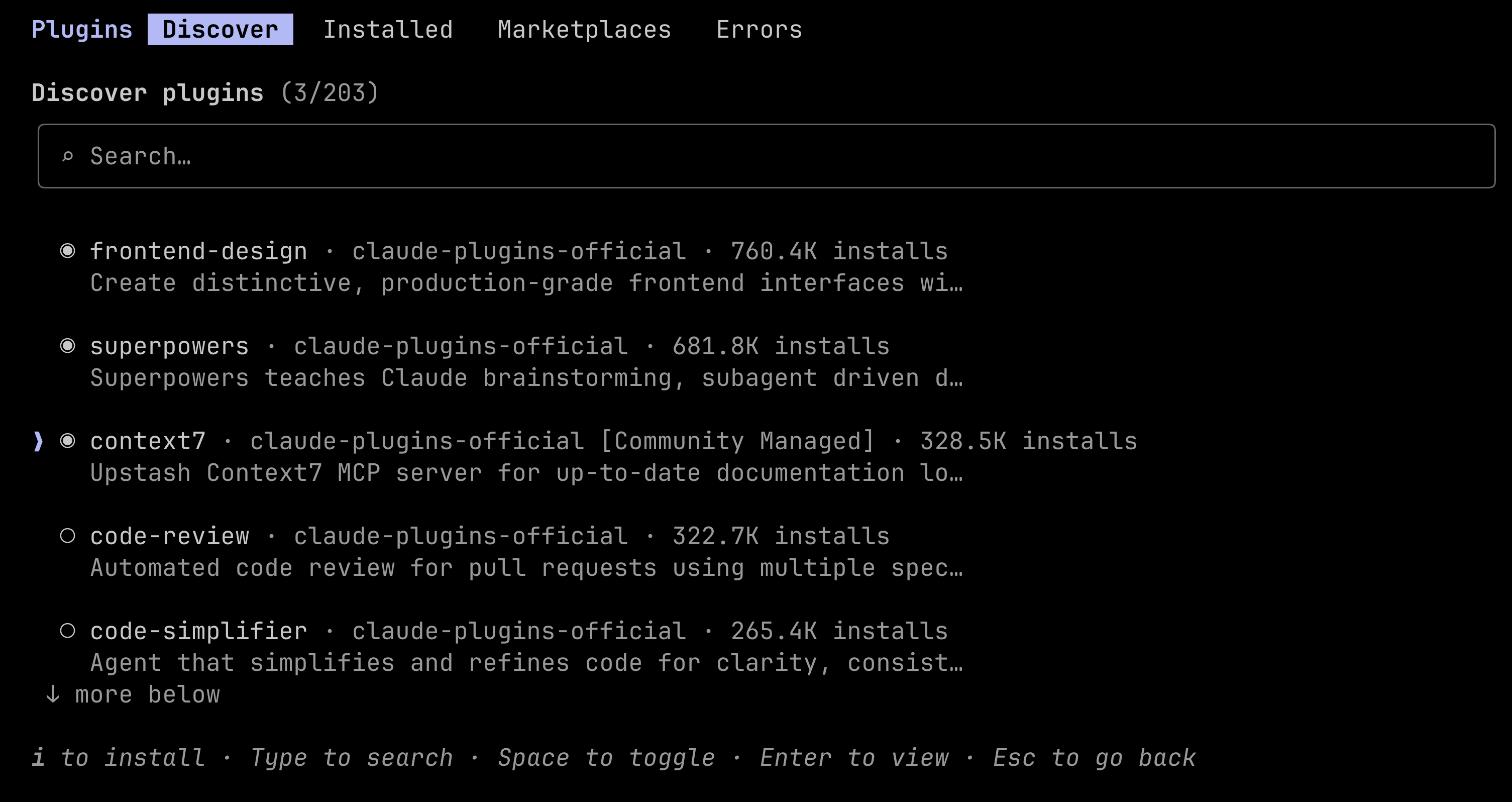
The built-in /plugin command gives you a terminal UI for browsing and installing.
# Inside a claude session:
/plugin
Navigate to the Discover tab → find a plugin → press Enter → choose scope (User or Project).
TIP
Don't press i to install these plugins as it will use global scope. We want to install with project scope for now. Instead, select each plugin and hit Enter to see a submenu of options for how you want to install the plugin.
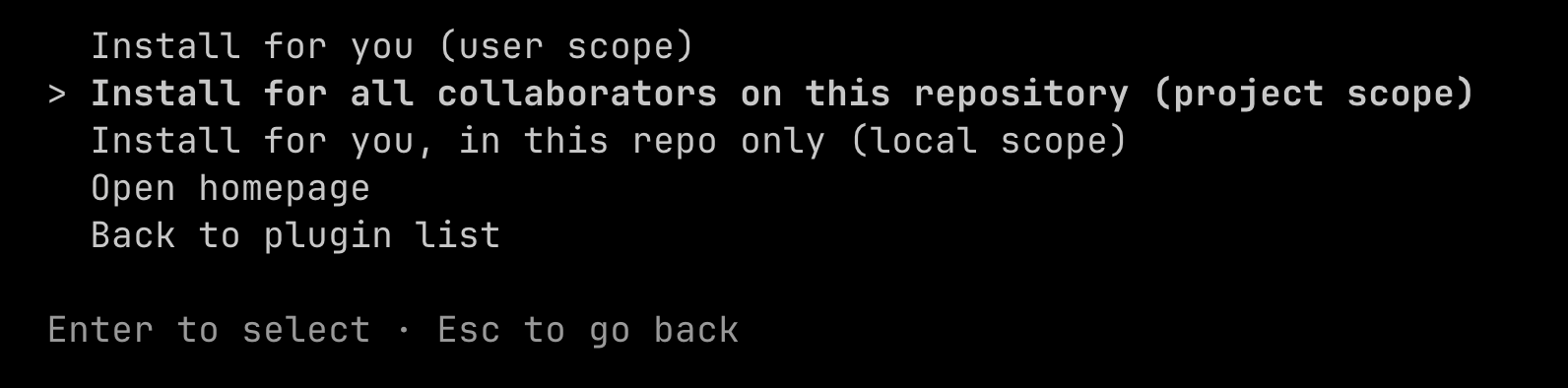
Make sure you select the plugin with the SPACEBAR and then click Enter to go to a submenu where you can select how you want Claude to install the plugin. The options are:
- Install for you (global user scope)
- Install for all collaborators on this repository (project scope)
- Install for you, in this repo only (local scope, creates a
CLAUDE.local.mdfile that should be git ignored)
Adding community marketplaces (default only has Anthropic's official plugins):
/plugin marketplace add author/repository
# e.g.
/plugin marketplace add alirezarezvani/claude-skills
After adding a marketplace, its plugins show up in the Discover tab alongside the official ones.
Method 2: CLI Commands (Non-interactive)
# Install from official marketplace
claude plugin install context7                   # defaults to user scope
claude plugin install context7 --scope project   # uses project scope

# Install from a specific marketplace
claude plugin install iac-terraform@devops-skills

# Add a community marketplace
claude plugin marketplace add devops-claude-skills

# List installed plugins
claude plugin list
TIP
You can uninstall a plugin using claude plugin uninstall <plugin> --scope [user | project]
You can also use npx skills add with a GitHub URL.
Method 3: Manual / Direct Install
For skills not in any marketplace, or when you prefer file-level control.
From a zip file:
# Personal install
unzip code-reviewer.zip -d ~/.claude/skills/

# Project install
unzip code-reviewer.zip -d .claude/skills/
From GitHub:
git clone https://github.com/author/skill-name.git
cp -r skill-name ~/.claude/skills/skill-name
One-liner curl (e.g. from Agensi marketplace):
mkdir -p ~/.claude/skills && curl -sL https://www.agensi.io/api/install/<slug> | tar xz -C ~/.claude/skills/After any manual install: restart Claude Code, then run /skills to confirm detection.
Verifying & Managing
ls ~/.claude/skills/          # list installed skills
rm -rf ~/.claude/skills/foo   # remove a skill
mv ~/.claude/skills/foo ~/.claude/skills/_foo  # disable (rename out)
The same skill folder works in OpenClaw and Codex CLI — you can symlink for a single source of truth:
ln -s ~/.claude/skills ~/.openclaw/skills
ln -s ~/.claude/skills ~/.codex/skills
Where to Find Skills
- Official: Anthropic's built-in marketplace via
/plugin - Agensi: agensi.io/skills — curated, security-reviewed marketplace
- Community: claude-plugins.dev — community registry with
npx claude-plugins install - GitHub: Direct repo cloning for open-source skills