
Fully Autonomous Claude Code
There are four main patterns for running Claude Code autonomously.
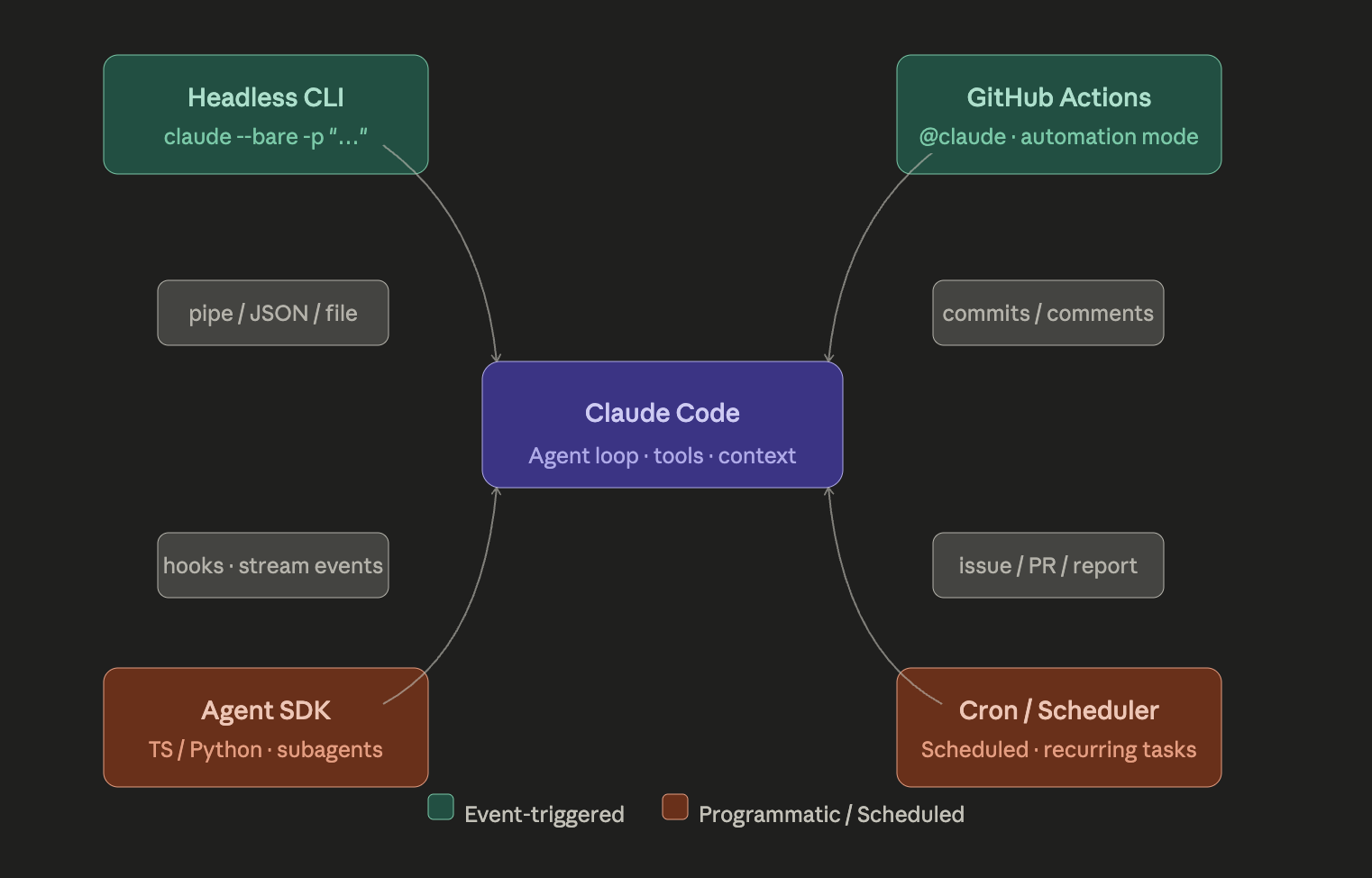
The four autonomous execution patterns
1. Headless CLI (claude -p)
The -p (or --print) flag allows running Claude Code without interaction — Claude reads the prompt, executes the task, and returns the result to stdout. This is the atomic unit that powers everything else.
Here are some interesting ways to use claude -p:
claude -p "explain this project"                 # query once and exit (great for scripting)
cat logs.txt | claude -p "explain these errors"  # Piping content
git log --oneline | claude -p "summarize these commits"
cat error.log | claude -p "find the root cause"
Add --bare to reduce startup time by skipping auto-discovery of hooks, skills, plugins, MCP servers, auto memory, and CLAUDE.md. Bare mode is useful for CI and scripts where you need the same result on every machine — a hook in a teammate's ~/.claude or an MCP server in the project's .mcp.json won't run because bare mode never reads them. Only flags you pass explicitly take effect.
Key flags for autonomous use:
claude --bare -p "Fix all linting errors in src/" \
  --allowedTools "Read,Edit,Bash" \
  --output-format json \
  --max-tokens 60000
2. GitHub Actions (event-driven)
The anthropics/claude-code-action@v1 is Anthropic's official GitHub Action that runs the full Claude Code runtime inside a standard GitHub Actions runner. Unlike typical AI reviewer tools that produce static comment threads, this action gives Claude a live shell environment — it can read files, run git commands, edit code, install dependencies, and push commits.
Two sub-modes:
- Interactive mode — Claude listens for
@claudementions in PR comments, issues, and review threads, then executes whatever the commenter requests. - Automation mode — Claude is given a
promptparameter directly in the workflow YAML and runs headlessly on every matching event (PR open, CI failure, issue creation, etc.).
- uses: anthropics/claude-code-action@v1
  with:
      prompt: 'Review this PR for security issues and comment findings'
      allowed_tools: 'Read,Bash'
  env:
      ANTHROPIC_API_KEY: ${{ secrets.ANTHROPIC_API_KEY }}
TIP
Cost is the silent killer of CI integrations — a developer manually running Claude knows what a session cost, but a GitHub Actions workflow runs invisibly at 3am across 40 open PRs. Recommended caps: review workflows at ~20K tokens per PR, fix workflows at ~60K, scheduled maintenance at ~100K per run.
See GitHub Integration for a deeper discussion of GitHub Actions Agentic Workflows.
3. Agent SDK (TypeScript/Python — programmatic)
The Claude Agent SDK runs an execution loop — Claude receives a task, decides what actions to take, executes them using built-in tools, processes the results, and continues until the task is done. Unlike the raw API which is stateless and returns when a response is generated, the SDK is stateful and runs until a goal is achieved.
The Agent SDK gives you access to subagents (ephemeral, isolated: fresh conversation, one task, summary returned to parent) and agent teams (multiple independent Claude Code instances that share a task list and message each other directly).
You get programmatic hooks for guardrails:
import { query, PreToolUseHook } from '@anthropic-ai/claude-code-sdk';

const hookFn = async (event) => {
    if (event.tool === 'Bash' && event.input.command.includes('rm -rf')) {
        return { error: 'Dangerous command blocked' };
    }
};

for await (const message of query({
    prompt: 'Refactor the auth module',
    options: { hooks: [new PreToolUseHook(hookFn, { tool_name: 'Bash' })] },
})) {
    console.log(message);
}
4. Cron / Scheduled jobs
Claude Code headless mode uses the -p flag to accept a prompt directly from the command line and execute without any user interaction — you just set it up and let it run. Pair this with cron or a scheduler for recurring autonomous tasks:
# crontab — run weekly dependency audit every Sunday at 2am
0 2 * * 0 ANTHROPIC_API_KEY=... /usr/local/bin/claude \
  --bare -p "Audit package.json for outdated deps, open a GitHub issue summarizing findings" \
  --allowedTools "Read,Bash" --max-tokens 100000
TIP
Common gotcha: cron doesn't load your shell profile, so authentication errors occur when cron runs but it works in your terminal. Set the API key explicitly in the cron command, or source a .env file that contains it.
Guardrails to keep in mind
When you remove the human from the loop, a few things become critical:
Tool allowlisting — always pass --allowedTools "Read,Edit" (or whatever subset the task needs). Don't grant Bash unless the task genuinely requires it.
Token budgets — there's no interactive session to abort a runaway agent. Set --max-tokens on every CI call.
--bare mode for reproducibility — without it, Claude Code picks up whatever ~/.claude config is on the runner, which gives you non-deterministic behavior across machines/teammates.
CLAUDE.md as your CI config — define review criteria, code style, and project rules once in CLAUDE.md — Claude Code follows them in every pipeline run.
Hooks as deterministic guardrails — hooks are commands you can set up to automatically run at specific points in Claude Code's process, giving developers a ton of control over the automation process and making sure any code the AI generates automatically follows the team's quality standards and rules. Think of them as the pre-commit / post-commit equivalent for the agent loop itself.