
GitHub Integration
Claude Code can integrate with GitHub to run automated agents in the GitHub infrastructure.
Two Different GitHub Integrations
There are actually two distinct GitHub integrations for Claude — worth disambiguating clearly
| Claude GitHub Integration Type | Description |
|---|---|
| Claude.ai GitHub Plugin | Context for chat Q&A, Read-only repo access, No automation |
| Claude Code GitHub Actions | Agentic coding in your repo, Read + write (PRs, commits), Event-driven triggers, Runs using GitHub Action runners |
1. Claude.ai GitHub Plugin (Context Integration)
Connects repositories directly to Claude.ai to provide comprehensive context for software development tasks. You select specific files and folders from a file browser, and Claude accesses and processes the content to inform its responses.
Key details:
- Use the "Sync" icon to pull the latest codebase version, and "Configure files" to modify which files and folders Claude analyzes.
- Works in both ad-hoc chats and Project knowledge bases
- For private repos, you need to grant access via the GitHub App — you can allow all repos or specific ones. Org admins get an email notification for approval requests.
- Purely read-only; no actions taken on the repo
2. Claude Code GitHub Actions (Agentic Automation)
This is the more powerful integration — with a simple @claude mention in any PR or issue, Claude can analyze code, create pull requests, implement features, and fix bugs, all while following your project's standards.
Core Capabilities
- Interactive Code Assistant — answers questions about code, architecture, and programming
- Code Review — analyzes PR changes and suggests improvements
- Code Implementation — implements fixes, refactoring, and new features
- PR/Issue Integration — works seamlessly with GitHub comments and PR reviews
- Flexible Tool Access — access to GitHub APIs and file operations (additional tools configurable)
- Progress Tracking — visual progress indicators with checkboxes that update dynamically as tasks complete
- Structured Outputs — validated JSON results that become GitHub Action outputs for complex automations
- Runs on Your Infrastructure — executes entirely on your own GitHub runner (API calls go to your chosen provider)
Trigger Patterns
The workflow kicks off when someone mentions @claude in a pull request or issue comment — like tagging a coworker. The claude.yml file acts as the instruction manual, containing specific prompts and commands for the AI.
Solutions Available Out of the Box
- Automatic PR code review (full review automation)
- Path-specific reviews (trigger on critical file changes)
- External contributor reviews (special handling for new contributors)
- Custom review checklists (enforce team standards)
- Scheduled maintenance (automated repository health checks)
- Issue triage & labeling (automatic categorization)
Setup
The easiest setup is via Claude Code in your terminal: run /install-github-app. This guides you through the GitHub App installation and required secrets. Note: this quickstart is only available for direct Anthropic API users — Bedrock/Vertex/Foundry require manual configuration.
Cloud Provider Support
You can create GitHub Actions workflow files that integrate with AWS Bedrock or Google Vertex AI as the backend, with complete configuration examples available in the docs.
The Mental Model
Think of it like this:
Claude.ai plugin = giving Claude a read-only view of your codebase to answer questions in chat
Claude Code GitHub Actions = giving Claude commit access and a task queue driven by
@mentionsand CI events
The Actions integration is essentially an agentic loop running inside your GitHub CI, with Claude as the actor — it reads context, plans changes, writes code, and opens PRs autonomously.
How do I use the Claude Code GitHub Actions feature?
If I create a GitHub issue and add a comment with @claude is that sufficient to kick off an agent that will work on the issue?
To directly answer your question: no, @claude alone is not sufficient — the GitHub Action workflow must first be installed and configured in your repo. Here's the full picture:
Prerequisites: What Must Be in Place First
The @claude mention is just a trigger phrase. The machinery that responds to it is a GitHub Actions workflow that you must set up. Without it, the comment does nothing.
┌─────────────────────────────────────────────────────────────┐
│                    Required Setup                           │
├─────────────────────────────────────────────────────────────┤
│  1. Claude GitHub App installed on your repo                │
│  2. ANTHROPIC_API_KEY stored as a GitHub Secret             │
│  3. .github/workflows/claude.yml workflow file in repo      │
└─────────────────────────────────────────────────────────────┘
         ↓ Only then does this work ↓
  @claude implement the feature in this issue
Setup (Two Paths)
Option A: Quick Setup (Recommended for direct API users)
Open Claude Code in your terminal and run /install-github-app. This guides you through setting up the GitHub App and required secrets.
NOTE: You must be a repository admin, and this quickstart is only available for direct Claude API users (not Bedrock/Vertex).
- You will be redirected to a browser that will allow you to install the GitHub Claude App.
- Screenshot
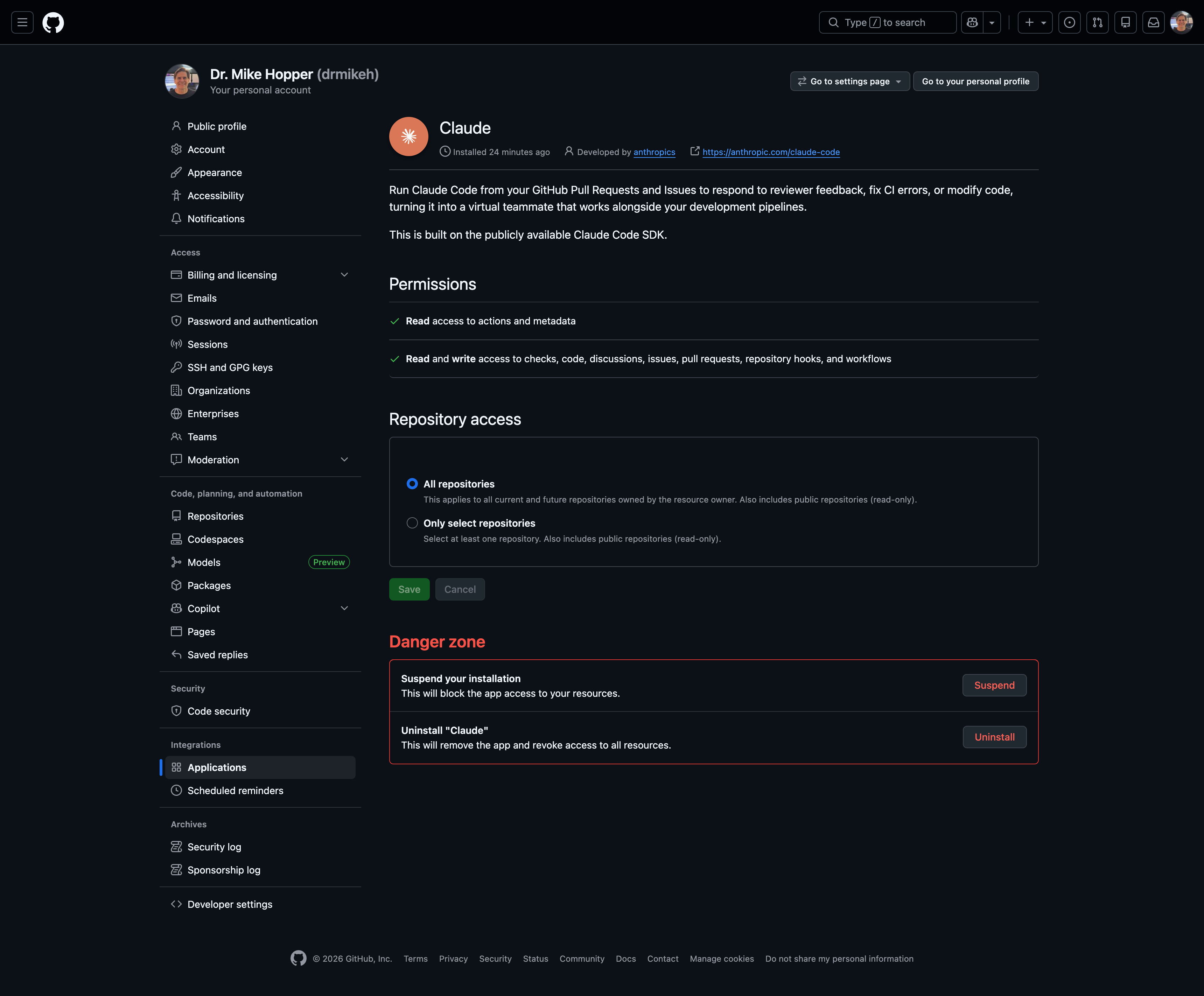
You can confirm installation by:
- In your browser, navigate to your GitHub Account
- Click on
Settings —> Integrations —> Applications —> Claude. - There will be 3 tabs at the top to look at.
- You will then return to the CLI to select options for the integration. I was presented with 2 options: using
@issueand something about pull requests. I selected both. - Select an authorization strategy: long-lived token or API key. I chose long-lived token.
- Allow Claude to create a Pull Request containing the GitHub Actions workflows for the options selected in step 2 above. Review the PR and merge it.
NOTE: 💬 Yes, at this point you are reviewing a Pull Request that creates a GH Actions workflow for triggering AI generated Pull Request reviews. That’s pretty meta.
Option B: Manual Setup
- Install the Claude GitHub App at
https://github.com/apps/claude— it needs Contents, Issues, and Pull requests read/write permissions - Add
ANTHROPIC_API_KEYto your repository secrets - Copy the workflow file from
examples/claude.ymlin the action repo into your.github/workflows/directory
The Minimal Workflow File
The basic workflow listens on issue_comment and pull_request_review_comment events and responds to @claude mentions:
name: Claude Code
on:
    issue_comment:
        types: [created]
    pull_request_review_comment:
        types: [created]

jobs:
    claude:
        runs-on: ubuntu-latest
        steps:
            - uses: anthropics/claude-code-action@v1
              with:
                  anthropic_api_key: ${{ secrets.ANTHROPIC_API_KEY }}
                  # Responds to @claude mentions in comments
Your Exact Scenario: Issue + @claude Comment
Once set up, yes — this is exactly the intended flow:
1. Someone creates a GitHub issue describing a feature/bug
2. A developer comments: "@claude implement this"
3. GitHub Actions fires on the issue_comment event
4. Claude reads the issue body + codebase context
5. Claude writes code and opens a PR
Example comment patterns that work:
@claude implement this feature based on the issue description
@claude fix the TypeError in the user dashboard component
@claude how should I implement user authentication for this endpoint?
Claude automatically analyzes the context and responds appropriately.
Customizing Claude's Behavior
Two mechanisms:
CLAUDE.md (repo-level, always applied) — define coding standards, review criteria, and project-specific rules. Claude follows these guidelines when creating PRs and responding to requests.
prompt parameter (workflow-level) — per-workflow instructions passed directly to the action. Useful for scoping different workflows differently (e.g., a security-focused review workflow vs. a feature-implementation workflow).
Cost Awareness
Two cost dimensions to track: GitHub Actions runner minutes, and Anthropic API token usage (which varies by task complexity and codebase size). Use --max-turns in claude_args to cap iterations and prevent runaway jobs.
TL;DR
| Question | Answer |
|---|---|
Is @claude alone sufficient? | No — the GitHub Action must be installed first |
| Setup complexity | Low — one command (/install-github-app) or 3 manual steps |
| Does it work on issues? | Yes, via issue_comment trigger |
| Will it open a PR automatically? | Yes, if instructed (e.g., "implement this") |
| Can you customize its behavior? | Yes — CLAUDE.md + workflow prompt parameter |