
Configuration Files
More details coming soon...
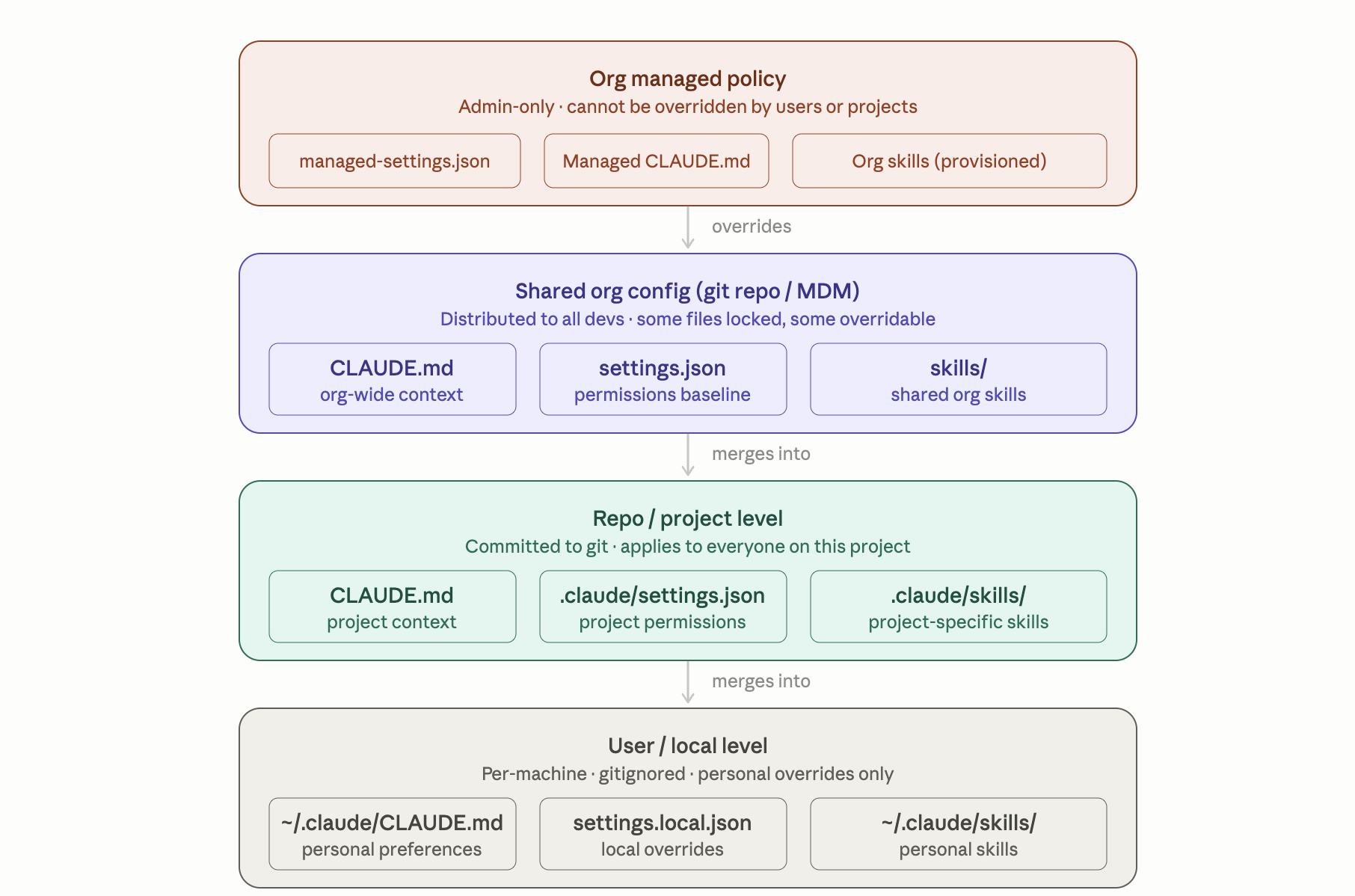
The Master State File
~/.claude.json
Claude’s master state file lives in ~ itself, not inside ~/.claude/.
This is the most important file — don't delete it as it manages the following:
- OAuth tokens and authentication state
- Personal MCP server configurations
- UI toggles, theme, and feature flags
- Used by both the Desktop app and the CLI
The .claude/ Folders
There are two .claude directories located in your home dir. These folders follow a “two-scope model” for specifying instructions.
~/.claude/              ← global personal config
  └── ...
<project>/.claude/      ← project-level, committable to git
  └── ...
TIP
💡 Think of it like a git config analogy: ~/.claude is your ~/.gitconfig, and project .claude/ is the repo-level .git/config.
The Global Personal Config Folder
~/.claude/
These apply across all projects on your machine.
| File/Dir | What it does |
|---|---|
settings.json | Default model, permission allow/deny rules for bash commands, lifecycle hooks, env var defaults. Overridden per-project. |
keybindings.json | Custom key bindings for the Claude Code TUI |
CLAUDE.md | Standing personal instructions injected into every session's system prompt — coding style, preferences, cross-project conventions |
rules/*.md | Modular instruction files, optionally path-gated. Good for splitting a large CLAUDE.md into focused rule sets |
commands/*.md | Single-file slash commands. foo.md → /user:foo. Simpler than skills |
skills/<n>/SKILL.md | Reusable multi-step prompt workflows, auto-invokable by description matching |
agents/*.md | Subagent definitions: each gets its own system prompt, tool access, and model preference |
output-styles/*.md | Named formatting/style definitions that can be referenced in settings |
projects/<proj>/memory/ | Auto-memory: notes Claude writes to itself across sessions |
projects/<proj>/<session>.jsonl | Full session transcripts. Plaintext — contains everything that passed through tools, including any secrets. Auto-deleted after 30 days by default |
Project-level <project>/.claude/
The project scoped CLAUDE.md file and .claude folder provide for specifying instructions and configuration settings at the project level that can be committed to source control and shared across the team.
| File/Dir | Commit? | What it does |
|---|---|---|
CLAUDE.md (project root) | ✅ | Primary project instructions: stack, architecture, conventions, key commands |
CLAUDE.local.md (project root) | ❌ gitignore | Your private overrides for this project |
.claude/settings.json | ✅ | Project permissions/hooks, overrides global settings |
.claude/settings.local.json | ❌ auto-gitignored | Your personal setting overrides for the project |
.mcp.json | ✅ | Team-shared MCP server definitions |
.claude/rules/*.md | ✅ | Project-scoped instruction modules, can be path-gated |
.claude/commands/*.md | ✅ | Project slash commands → /project:<filename> |
.claude/skills/*/SKILL.md | ✅ | Agent Skills |
.claude/agents/*.md | ✅ | Project-scoped subagent definitions |
.worktreeinclude | ✅ | Gitignored files to copy into new worktrees (e.g. .env) |
Instruction Files - CLAUDE.md
Use CLAUDE.md files to give context and instructions to Claude. They save time + tokens, and are super helpful for info you’d otherwise include in your prompts. These are loaded hierarchically:
- Global:
~/.claude/CLAUDE.md(applies to all projects) - Project root:
./CLAUDE.md(project-wide context) - Subdirectories: Component-specific instructions
A Simple CLAUDE.md File
Note that in practice, your CLAUDE.md will have more content than what is shown in this example.
# Project context

## Coding standards

- Use TypeScript for all new code
- Follow existing ESLint configuration
- Write tests for all new functions using Jest
- Use functional components with hooks in React

## Architecture

- Frontend: Next.js with TypeScript
- Backend: Node.js with Express
- Database: PostgreSQL with Prisma
- State: Zustand for client state

## File organization

- Components in `src/components/`
- Utilities in `src/utils/`
- Tests alongside source files with `.test.ts` extension
Settings Files - settings.json
The settings.json files are used to configure Claude with global and project-level settings and environment variables.
Claude Code uses hierarchical settings stored in JSON files:
- User settings:
~/.claude/settings.json(applies to all projects) - Project settings:
.claude/settings.json(shared with team, checked into git) - Local project settings:
.claude/settings.local.json(personal, ignored by git)
What goes into a settings.json file?
- models - The default models to use (primary and fast)
- permissions - allow, ask, deny
- ui - theme, statusline, etc.
- plugins enabled plugins to load
- mcpServers - for connecting to external tools
- env - environment variables to load for each session
- hooks - automated actions triggered by specific events
TIP
See https://code.claude.com/docs/en/settings#worktree-settings for the official documentation and the full list of properties.
An Example settings.json File
{
    "model": "claude-sonnet-4-20250514",
    "maxTokens": 4096,
    "permissions": {
        "allowedTools": ["Read", "Write", "Bash(git *)"],
        "deny": ["Read(./.env)", "Read(./.env.*)", "Write(./production.config.*)"]
    },
    "hooks": {
        "PostToolUse": [
            {
                "matcher": "Write(*.py)",
                "hooks": [
                    {
                        "type": "command",
                        "command": "python -m black $file"
                    }
                ]
            }
        ]
    }
}
Memory Files
memory.md
Memory files are optional but many people find them helpful. Memory files are usually located in a specific project. The purpose of a memory file is for Claude to “learn as it goes” as it works with you. During your Claude sessions, you may find yourself guiding Claude towards a specific way of doing things. Memory files allow Claude to capture these preferences and save them for future reference.
Differences in Configuration between the Desktop App and the CLI
- The Desktop app and CLI both read
~/.claude.jsonfor auth and~/.claude/settings.jsonfor preferences. - The Desktop app does not load project-level
.claude/files — that's CLI/Claude Code territory.- Caveat: When using the Code tab in the Desktop app and setting a session’s project folder, the project-level
/claude/files should be read.
- Caveat: When using the Code tab in the Desktop app and setting a session’s project folder, the project-level
Settings Precedence
Managed settings (enterprise)
  → CLI flags (--permission-mode, --settings)
    → project .claude/settings.json
      → ~/.claude/settings.json
        → defaults
What about the Claude Desktop Profile Settings
The Claude Desktop app has several User Profile settings accessible via the Settings menu.
- These settings are not stored in any of the above locations.
- They are stored server-side in your Anthropic account.
- Claude Code never reads them.
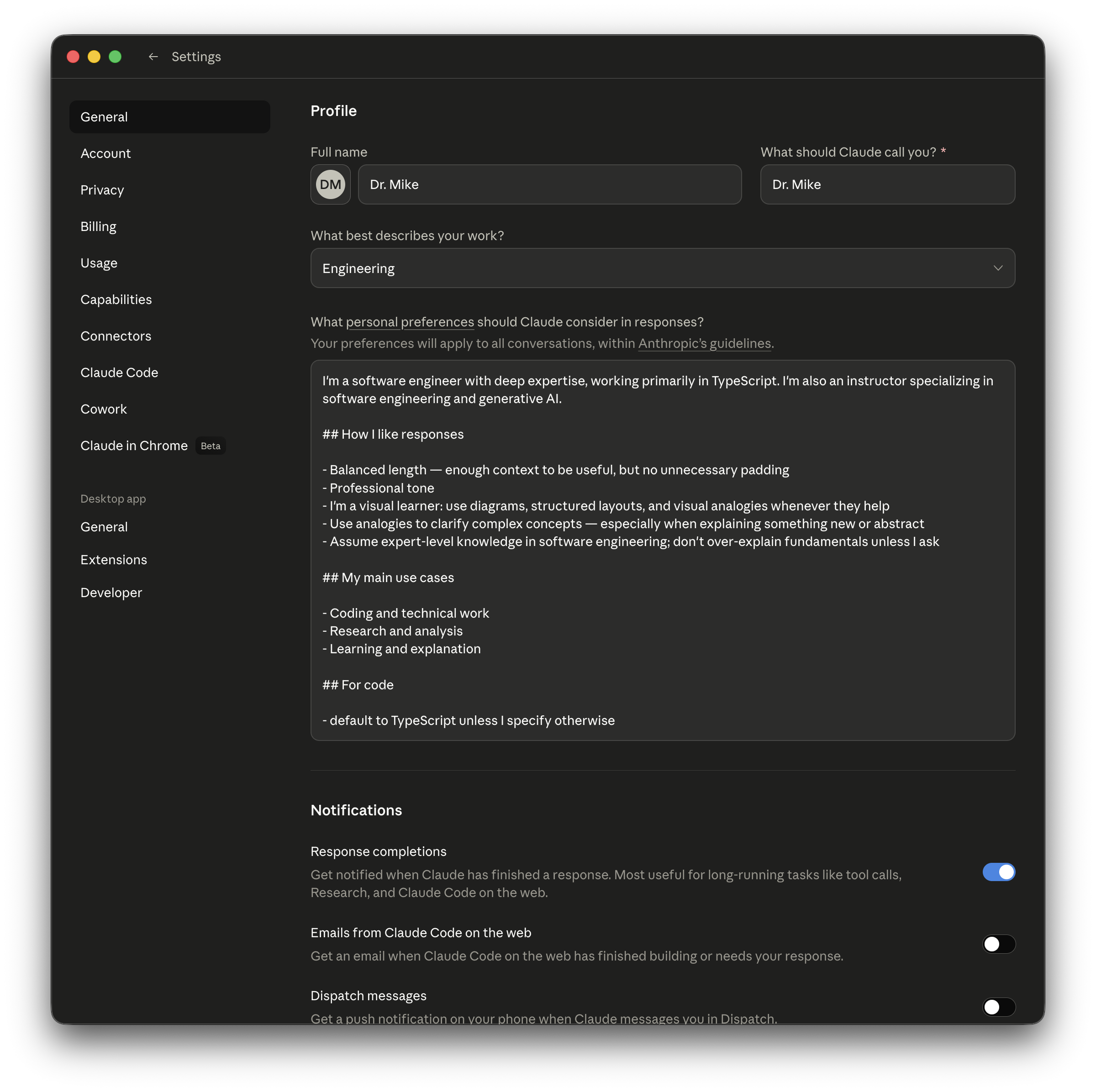
Comparing Claude Profile Settings with Claude Code Settings
Note that these are two separate systems that don't share storage:
| Claude.ai Profile Settings | Claude Code ~/.claude/CLAUDE.md | |
|---|---|---|
| Set via | Settings UI on claude.ai | File you create manually |
| Used by | claude.ai web/desktop chat app | Claude Code CLI (claude command) |
| Stored | Anthropic's servers (your account) | Local file on your machine |
| Scope | All chat conversations on claude.ai | All Claude Code CLI sessions |
Where does the Desktop App Stores Its Config?
In addition, the Claude Desktop app has its own local config file, separate from both:
- macOS:
~/Library/Application Support/Claude/claude_desktop_config.json - Windows:
%APPDATA%\Claude\claude_desktop_config.json
This file is primarily used to configure MCP servers that Claude Desktop should automatically start when the app launches. It doesn't hold your profile preferences — those remain server-side.